9 Must-Have Work From Home Essentials to Boost Your Productivity
Transform Your Home Office with These 9 Must-Have Essentials
Working from home offers incredible flexibility, but it also means you’re responsible for setting up a productive workspace. When I first started remote work in 2007, my setup was minimal—a basic laptop and a wireless connection. I often worked from the kitchen counter or couch, and tasks like printing required a trip to the local store. Over time, I upgraded my tools, and now, my home office is a powerhouse of efficiency. If you’re new to remote work or looking to optimize your space, here are the work from home essentials I can’t live without.
1. A Reliable Computer
A computer is the foundation of any home office. Whether you prefer a desktop or laptop, the right choice depends on your job requirements. For example, many remote customer service roles require a PC because their software is Windows-compatible. Some positions even mandate dual monitors for better multitasking.
Before investing in a new computer, review job listings to ensure your device meets the technical specifications. Personally, I use a MacBook Pro, which integrates seamlessly with my other Apple devices. If you opt for a desktop, don’t forget to add a keyboard, mouse, and mouse pad—ergonomic options are widely available and can significantly improve comfort.
2. High-Speed Internet Connection
A fast and stable internet connection is non-negotiable for remote work. While Wi-Fi or hotspots may suffice for some roles, most customer service jobs require a hard-wired connection like DSL, cable, or fiber. Satellite and dial-up are typically too slow and often disqualify you from job opportunities. Always check the internet requirements in job postings to ensure compliance.
3. Smartphone for Security and Mobility
Two-factor authentication is standard for securing online accounts, so a smartphone is essential for receiving verification codes via text or a third-party app. Beyond security, your phone keeps you connected for calls, texts, and emails, allowing you to work on the go. It’s a small but critical tool for staying productive and secure.
4. A Dedicated Desk
While the kitchen table works in a pinch, a dedicated desk keeps your tools organized and accessible. The right desk depends on your space, budget, and comfort needs. If you spend long hours at your workspace, consider an adjustable standing desk to reduce strain and boost productivity. If that’s out of reach, laptop stands or adjustable risers can offer similar benefits.
Storage is another key factor. Look for a desk with compartments or shelves to store file folders, pens, routers, and modems. For those who like to move around, a lap desk provides mobility without sacrificing comfort.
5. Ergonomic Desk Chair
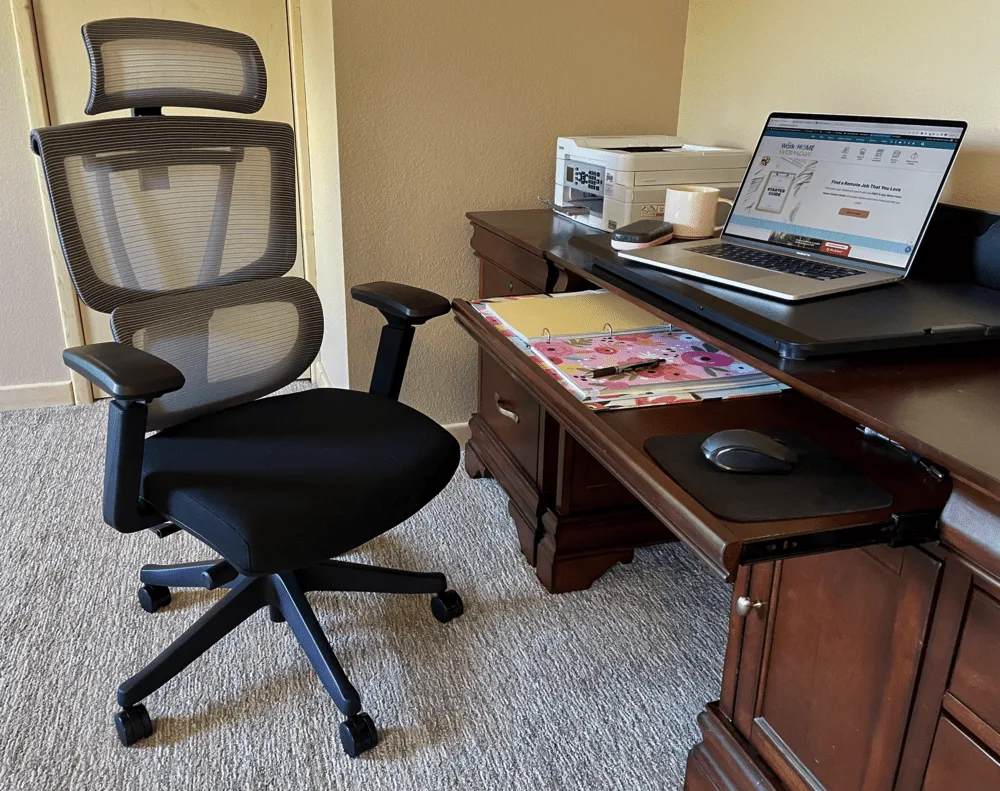
Finding the perfect office chair can be a challenge, but it’s worth the effort. For years, I relied on a pillow for lumbar support until I discovered the FlexiSpot Premium Ergonomic Office Chair (C7). This chair offers full-body support, from head to legs, with adjustable features, smooth-rolling casters, and breathable fabric—ideal for hot summer days.
If a new chair isn’t in your budget, consider a memory foam seat cushion or lumbar support pillow. Once you experience the comfort of an ergonomic chair, you’ll never want to go back.
6. All-in-One Printer
A reliable printer is a game-changer for home offices. My top pick is the Brother INKvestment Tank Printer. It’s easy to set up, works wirelessly, and handles printing, copying, scanning, and faxing. The best part? The ink lasts forever. The printer comes with a one-year ink supply, which lasted me well over a year, and refill packs are affordable. Compared to my old printer, which required expensive ink replacements twice a year, this is a cost-effective solution.
7. Essential Office Supplies
When you work from home, you can’t pop into a supply closet for last-minute needs. That’s why it’s important to stock up on the basics. Here’s a list of must-have supplies:
- Pens, highlighters, and Sharpies
- Stapler and staples
- Notebooks and printer paper
- Printer ink
- Hole puncher
- File folders
- Power strip
- Paper clips
- Envelopes
- Tape and scissors
- Day planner or calendar
- Label maker
8. Exercise Equipment for Movement
One downside of remote work is reduced physical activity. Without a commute or office movement, it’s easy to become sedentary. Fortunately, there are plenty of ways to stay active. Under-desk treadmills, ellipticals, and bikes are great for multitasking. Balance boards and stability balls can also keep you moving while you work.
I was gifted the FlexiSpot Deskcise Pro V9, and it’s been a game-changer. This compact, mobile desk bike lets me work out my lower body while tackling work tasks. For a simpler approach, a yoga mat and free YouTube workout videos can help you stay active during breaks.
9. Environmental Gadgets for Comfort
Working remotely means you can design your ideal workspace—no more harsh fluorescent lights or dull office decor. Set the mood with ambient lighting, plants, or even a small fountain for a calming atmosphere. Consider noise-canceling headphones for focus or a white noise machine to block distractions. These small touches can make a big difference in your comfort and productivity.
With these work from home essentials, you’ll create a space that’s not only functional but also enjoyable to work in. Whether you’re just starting out or looking to upgrade, these tools will help you thrive in your remote career.
For more tips on setting up your home office, check out this authoritative guide on ergonomic workspaces.